
티스토리 뷰
728x90
반응형
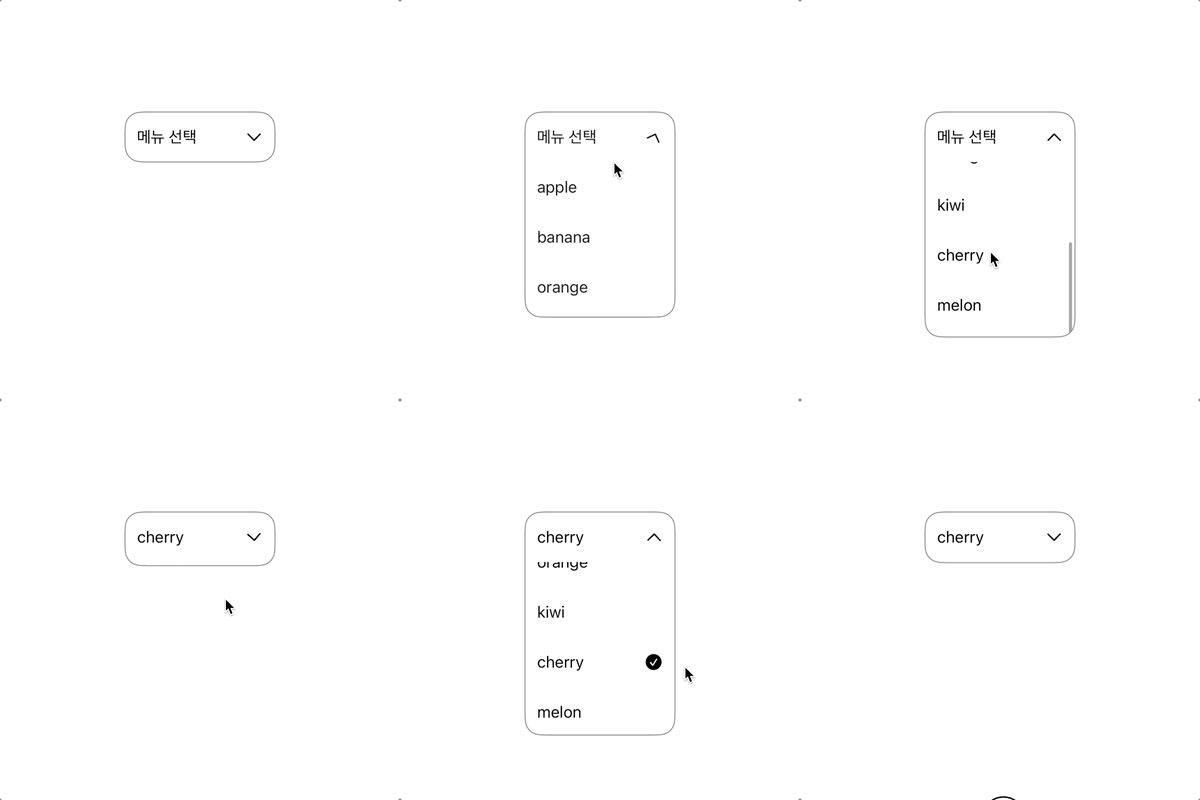
// https://stackademic.com/blog/swiftui-dropdown-menu-3-ways-picker-menu-and-custom-from-scratch
/// 드롭다운 메뉴
struct DropDownMenu: View {

    let placeholder: String
    let options: [String]

    var menuWdith: CGFloat? = 150
    var buttonHeight: CGFloat = 50
    var maxItemDisplayed: Int = 3

    @Binding var selectedOptionIndex: Int?
    @Binding var showDropdown: Bool

    @State private var scrollPosition: Int?

    private var menuTitle: String {
        if let selectedOptionIndex {
            options[selectedOptionIndex]
        } else {
            placeholder
        }
    }

    var body: some  View {
        VStack(spacing: 0) {
            // selected item
            Button(action: {
                withAnimation {
                    showDropdown.toggle()
                }
            }, label: {
                HStack(spacing: nil) {
                    Text(menuTitle)
                    Spacer()
                    Image(systemName: "chevron.down")
                        .rotationEffect(.degrees((showDropdown ?  -180 : 0)))
                }
            })
            .padding(.horizontal, 12)
            .frame(height: buttonHeight)


            // selection menu
            if showDropdown {
                let scrollViewHeight = options.count > maxItemDisplayed ?
                buttonHeight * CGFloat(maxItemDisplayed) + buttonHeight / 2 :
                buttonHeight * CGFloat(options.count)

                ScrollView {
                    LazyVStack(spacing: 0) {
                        ForEach(0..<options.count, id: \.self) { index in
                            Button(action: {
                                withAnimation {
                                    selectedOptionIndex = index
                                    showDropdown.toggle()
                                }
                            }, label: {
                                HStack {
                                    Text(options[index])
                                    Spacer()
                                    if (index == selectedOptionIndex) {
                                        Image(systemName: "checkmark.circle.fill")
                                    }
                                }
                                .frame(maxWidth: menuWdith, alignment: .leading)
                                .padding(.horizontal, 12)
                                .frame(height: buttonHeight)
                            })
                        }
                    }
                    .scrollTargetLayout()
                }
                .scrollPosition(id: $scrollPosition)
                .scrollDisabled(options.count <= maxItemDisplayed)
                .frame(height: scrollViewHeight)
                .onAppear {
                    scrollPosition = selectedOptionIndex
                }
            }
        }
        .background(.white)
        .clipShape(.rect(cornerRadius: 16))
        .overlay {
            RoundedRectangle(cornerRadius: 16)
                .stroke(.gray, lineWidth: 1)
        }
        .foregroundStyle(.black)
        .font(.callout)
        .frame(maxWidth: menuWdith)
        .frame(height: buttonHeight, alignment: .top) // 높이 제한 시 드롭다운 형식으로 표시되고, 해제 시 스크롤뷰 크기만큼 상위 뷰 늘어남
        .zIndex(100)
    }
}

#Preview {
    @Previewable @State var selectedOptionIndex: Int?
    @Previewable @State var showDropdown =  false
    let fruits = ["apple", "banana", "orange", "kiwi", "cherry", "melon"]

    ZStack {
        DropDownMenu(
            placeholder: "메뉴 선택",
            options: fruits,
            selectedOptionIndex: $selectedOptionIndex,
            showDropdown: $showDropdown
        )
    }
    .frame(maxWidth: .infinity, maxHeight: .infinity)
    .background(.white)
    .onTapGesture {
        withAnimation {
            showDropdown =  false
        }
    }
}
iOS
Swift
SwiftUI
Xcode
Objectivew-C
드롭다운
드랍다운
Drop Down
Menu
선택 메뉴
Select menu
Spinner
Picker
Segment
커스텀 피커
728x90
반응형
'iOS SwiftUI' 카테고리의 다른 글
| iOS SwiftUI Auto Scrolling Infinite Carousel Timer Animation (1) | 2025.09.01 |
|---|---|
| iOS SwiftUI Animation repeatForever autoreverses 반복 애니메이션 (2) | 2025.08.01 |
| iOS SwiftUI Infinite Carousel 무한 스크롤 배너 + Timer (1) | 2025.05.01 |
| iOS SwiftUI get color from image (이미지에서 평균 색상 추출) (0) | 2025.03.01 |
| iOS SwiftUI View Aligned Carousel Scrollview Paging (다음 뷰 약간 보이는 페이징 스크롤) (0) | 2025.02.01 |
댓글
공지사항
최근에 올라온 글
최근에 달린 댓글
- Total
- Today
- Yesterday
링크
TAG
- localizable
- picker
- 인디케이터
- 로컬라이징
- Reject
- AppStore
- 리젝
- ios
- 현지화
- 다국어
- connect
- Language
- Apple
- 심사
- localizing
- 엑스코드
- SWIFT
- TabView
- objective-c
- 프로그레스
- Xcode
- macos
- indicator
- swiftUI
- TabBar
- permission
- 아이오에스
- Authorization
- 테이블뷰
- 스위프트
| 일 | 월 | 화 | 수 | 목 | 금 | 토 |
|---|---|---|---|---|---|---|
| 1 | ||||||
| 2 | 3 | 4 | 5 | 6 | 7 | 8 |
| 9 | 10 | 11 | 12 | 13 | 14 | 15 |
| 16 | 17 | 18 | 19 | 20 | 21 | 22 |
| 23 | 24 | 25 | 26 | 27 | 28 | 29 |
| 30 | 31 |
글 보관함