티스토리 뷰
728x90
반응형
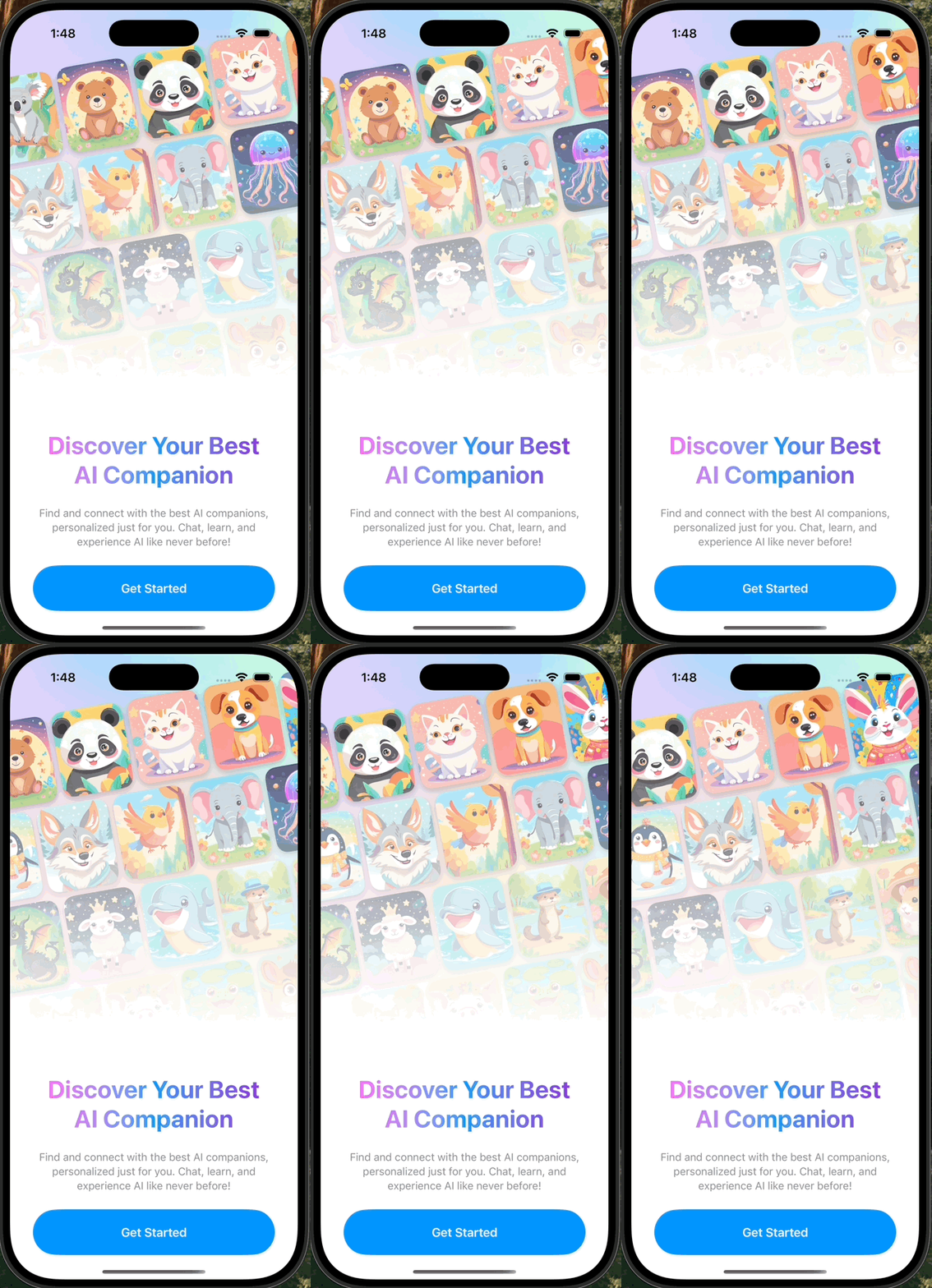
struct InfiniteCarouselView: View {

    init(imageNames: [String], velocity: CGFloat = 1) {
        self.imageNames = imageNames

        var items: [Item] = []

        items.append(contentsOf: imageNames.map { Item(id: UUID(), imageName: $0) })
        items.append(contentsOf: imageNames.map { Item(id: UUID(), imageName: $0) })
        items.append(contentsOf: imageNames.map { Item(id: UUID(), imageName: $0) })

        self.items = items
        self.velocity = velocity

        let length = (CarouselCard.itemSize.width + itemSpacing) * CGFloat(imageNames.count)
        self.x = length
        self.carouselLength = length
    }

    private let imageNames: [String]
    private let items: [Item]
    private let velocity: CGFloat

    @State private var scrollPosition = ScrollPosition()
    @State private var timer = Timer
        .publish(every: 0.01, on: .main, in: .common)
        .autoconnect()

    @State private var x: CGFloat

    private let itemSpacing: CGFloat = 8
    private let carouselLength: CGFloat

    var body: some View {
        ScrollView(.horizontal, showsIndicators: false) {
            HStack(spacing: itemSpacing) {
                ForEach(items) { item in
                    CarouselCard(imageName: item.imageName)
                        .id(item.id)
                }
            }
            .safeAreaPadding(.horizontal)
        }
        .scrollClipDisabled()
        .scrollPosition($scrollPosition)
        .onReceive(timer) { _ in
            if x >= carouselLength * 2 || x <= 0 {
                x = carouselLength
            } else {
                x += velocity
            }
        }
        .onChange(of: x) {
            scrollPosition.scrollTo(x: x)
        }
        // 1. we need to detect when the scroll view is manually started / stopped
        .onScrollPhaseChange { oldPhase, newPhase in
            switch (oldPhase, newPhase) {
            case (.idle, .idle):
                break

            case (_, .interacting):
                timer.upstream.connect().cancel()

            case (_, .idle):
                timer = Timer
                    .publish(every: 0.01, on: .main, in: .common)
                    .autoconnect()

            default:
                break
            }
        }
        // 2. we need to observe the distance the scroll view was moved during the period
        .onScrollGeometryChange(for: Double.self) { scrollGeometry in
            scrollGeometry.contentOffset.x
        } action: { oldValue, newValue in
            x = newValue
        }

    }
}

struct Item: Identifiable {
    let id: UUID
    let imageName: String
}

struct CarouselCard: View {

    let imageName: String

    static let itemSize = CGSize(width: 100, height: 120)

    var body: some View {
        Image(imageName)
            .resizable()
            .scaledToFill()
            .frame(width: Self.itemSize.width, height: Self.itemSize.height)
            .clipShape(RoundedRectangle(cornerRadius: 16))
            .shadow(color: .black.opacity(0.3), radius: 4, x: 0, y: 4)
    }
}

#Preview {
    let imageNames = (1...7).map { String($0) }
    InfiniteCarouselView(imageNames: imageNames)
}
struct AnimatedMeshGradientView: View {

    @State private var isAnimated = false

    var body: some View {
        MeshGradient(
            width: 3,
            height: 3,
            points: [
                [0.0, 0.0], isAnimated ? [0.75, 0.0] : [0.25, 0.0], [1.0, 0.0],
                isAnimated ? [0.0, 0.8] : [0.0, 0.4], isAnimated ? [0.7, 0.2] : [0.9, 0.4], [1.0, 0.5],
                [0.0, 1.0], isAnimated ? [0.3, 1.0] : [0.6, 1.0], [1.0, 1.0]
            ],
            colors: [
                .softLavender, .paleSkyBlue, .mintGreen,
                .dustyRose, .peachCream, .babyBlue,
                .lilacMist, .seafoamPastel, .blushPink
            ]
        )
        .ignoresSafeArea()
        .onAppear {
            withAnimation(.spring(.smooth).repeatForever(autoreverses: true)) {
                isAnimated = true
            }
        }
    }
}
struct OnboardingView: View {
    var body: some View {
        let imageNames1 = (1...7).map { String($0) }
        let imageNames2 = (8...14).map { String($0) }
        let imageNames3 = (15...21).map { String($0) }
        let imageNames4 = (22...28).map { String($0) }

        ZStack {
            AnimatedMeshGradientView()

            VStack {
                VStack {
                    InfiniteCarouselView(imageNames: imageNames1, velocity: 0.5)
                    InfiniteCarouselView(imageNames: imageNames2, velocity: -0.25)
                    InfiniteCarouselView(imageNames: imageNames3, velocity: 0.3)
                    InfiniteCarouselView(imageNames: imageNames4, velocity: -0.2)
                }
                .rotationEffect(.degrees(-10))

                Spacer()
            }

            LinearGradient(
                stops: [
                    .init(color: .clear, location: 0.0),
                    .init(color: .white, location: 0.6),
                    .init(color: .white, location: 1.0),
                ],
                startPoint: .top,
                endPoint: .bottom
            )
            .ignoresSafeArea()

            VStack(spacing: 24) {
                Spacer()

                Text("Discover Your Best\nAI Companion")
                    .font(.system(.largeTitle, design: .default, weight: .bold))
                    .multilineTextAlignment(.center)
                    .foregroundStyle(
                        LinearGradient(
                            colors: [.aiPink, .roboticBlue, .futuristicViolet],
                            startPoint: .leading,
                            endPoint: .trailing
                        )
                    )

                Text("Find and connect with the best AI companions, personalized just for you. Chat, learn, and experience AI like never before!")
                    .font(.system(.subheadline, design: .default, weight: .regular))
                    .multilineTextAlignment(.center)
                    .foregroundStyle(.gray)
                    .padding(.horizontal, 32)

                Button {
                    // TODO
                } label: {
                    Text("Get Started")
                        .font(.system(.headline, design: .default, weight: .semibold))
                        .foregroundStyle(.white)
                        .frame(height: 64)
                        .frame(maxWidth: .infinity)
                        .background(Color.roboticBlue)
                        .clipShape(Capsule())
                }
                .padding(.horizontal, 32)
            }

        }
    }
}

#Preview {
    OnboardingView()
}
extension Color {
    static let deepPurple = Color(red: 89/255, green: 46/255, blue: 131/255)    // Deep learning purple
    static let neonBlue = Color(red: 66/255, green: 218/255, blue: 245/255)     // Neural network blue
    static let techTeal = Color(red: 23/255, green: 190/255, blue: 187/255)     // Tech teal
    static let futuristicViolet = Color(red: 147/255, green: 51/255, blue: 234/255) // Futuristic violet
    static let quantumGreen = Color(red: 0/255, green: 255/255, blue: 179/255)   // Quantum computing green
    static let dataRed = Color(red: 255/255, green: 71/255, blue: 87/255)        // Data analysis red
    static let aiPink = Color(red: 255/255, green: 107/255, blue: 255/255)       // AI assistant pink
    static let roboticBlue = Color(red: 0/255, green: 150/255, blue: 255/255)    // Robotic blue
    static let cyberYellow = Color(red: 255/255, green: 214/255, blue: 10/255)   // Cybernetic yellow

    static let softLavender = Color(red: 220/255, green: 208/255, blue: 255/255)   // Soft lavender
    static let paleSkyBlue = Color(red: 176/255, green: 218/255, blue: 255/255)    // Pale sky blue
    static let mintGreen = Color(red: 198/255, green: 255/255, blue: 226/255)      // Mint green
    static let dustyRose = Color(red: 255/255, green: 198/255, blue: 218/255)      // Dusty rose
    static let peachCream = Color(red: 255/255, green: 224/255, blue: 196/255)     // Peach cream
    static let babyBlue = Color(red: 198/255, green: 222/255, blue: 255/255)       // Baby blue
    static let lilacMist = Color(red: 232/255, green: 208/255, blue: 238/255)      // Lilac mist
    static let seafoamPastel = Color(red: 202/255, green: 255/255, blue: 242/255)  // Seafoam pastel
    static let blushPink = Color(red: 255/255, green: 218/255, blue: 233/255)      // Blush pink
}
import SwiftUI

@main
struct AppDuckInfiniteCarouselTutorialApp: App {
    var body: some Scene {
        WindowGroup {
            OnboardingView()
        }
    }
}
Sources
https://github.com/appbeyond-io/AutoScrollingInfiniteCarousel-iOS
iOS
SwiftUI
Auto Scrolling
Infinite Carousel
Timer Animation
Xcode
Android
Objective-C
MeshGradient
repeatForever
LinearGradient
rotationEffect
ScrollPosition
onScrollGeometryChange
728x90
반응형
'iOS SwiftUI' 카테고리의 다른 글
| WWDC 2025: Foundation Models — Apple이 공개한 온디바이스 LLM API (0) | 2026.03.01 |
|---|---|
| iOS SwiftUI Animation repeatForever autoreverses 반복 애니메이션 (2) | 2025.08.01 |
| iOS SwiftUI DropDownMenu 드롭다운 메뉴 (Custom Picker) (1) | 2025.06.01 |
| iOS SwiftUI Infinite Carousel 무한 스크롤 배너 + Timer (1) | 2025.05.01 |
| iOS SwiftUI get color from image (이미지에서 평균 색상 추출) (0) | 2025.03.01 |
댓글
공지사항
최근에 올라온 글
최근에 달린 댓글
- Total
- Today
- Yesterday
링크
TAG
- TabBar
- 다국어
- 테이블뷰
- ios
- 현지화
- objective-c
- connect
- Reject
- Language
- permission
- Apple
- TabView
- macos
- SWIFT
- Authorization
- 리젝
- 아이오에스
- Xcode
- 프로그레스
- 엑스코드
- localizable
- 심사
- 인디케이터
- localizing
- 스위프트
- AppStore
- swiftUI
- picker
- 로컬라이징
- indicator
| 일 | 월 | 화 | 수 | 목 | 금 | 토 |
|---|---|---|---|---|---|---|
| 1 | ||||||
| 2 | 3 | 4 | 5 | 6 | 7 | 8 |
| 9 | 10 | 11 | 12 | 13 | 14 | 15 |
| 16 | 17 | 18 | 19 | 20 | 21 | 22 |
| 23 | 24 | 25 | 26 | 27 | 28 | 29 |
| 30 | 31 |
글 보관함